OpenTTD – Auto-Renewing Aging Vehicles
Transport Tycoon Deluxe (OpenTTD) players often spend a considerable amount of time replacing old vehicles when breakdowns caused by aging fleets disrupt cargo and passenger transport, showing up as negative income. However, this is not necessary. You can easily replace aging vehicles such as trucks, buses, ships, aircraft, and trains with a newer model of the same type if it is still in production, or with another new model of your choice if it is not.
To keep using old vehicles continuously, you need to enable a setting in the options menu. Otherwise, as the years pass, older vehicles will go out of production and can no longer be used.
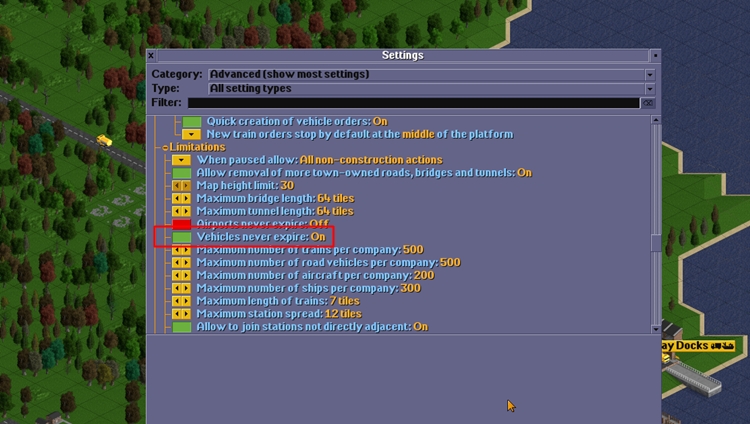
When you start the game, go to the Settings section from the Main Menu, select the Advanced option from the Category section, and enable the “Vehicles never expire” option found under the Limitations sub-heading at the bottom.
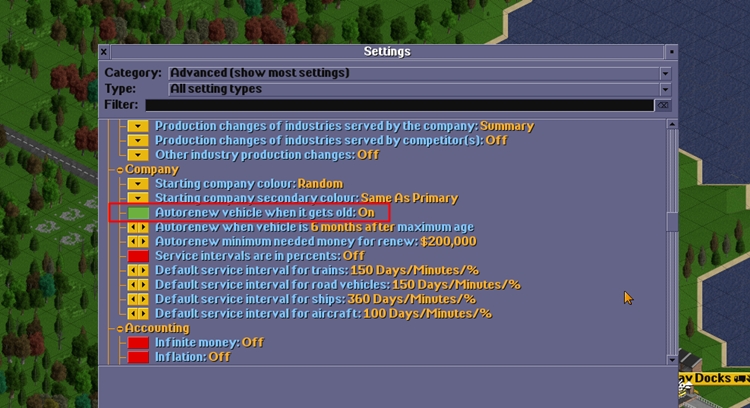
To enable automatic renewal of aging vehicles, another setting must be activated. Enter the Settings section either during gameplay or from the main menu. With the Category set to Advanced, type “old” into the filter field at the bottom and enable the “Autorenew vehicle when it gets old” option found under the Company sub-heading.
Replacing Vehicles in Bulk
If you want to start using a new model when it becomes available for a vehicle type, doing so is quite straightforward. However, there is one important tip. To avoid any confusion, grouping your trucks by type when you start the game will allow you to use this feature without any issues.
If you are using mods, they can cause confusion in this process. Grouping your vehicles will prevent any such complications.
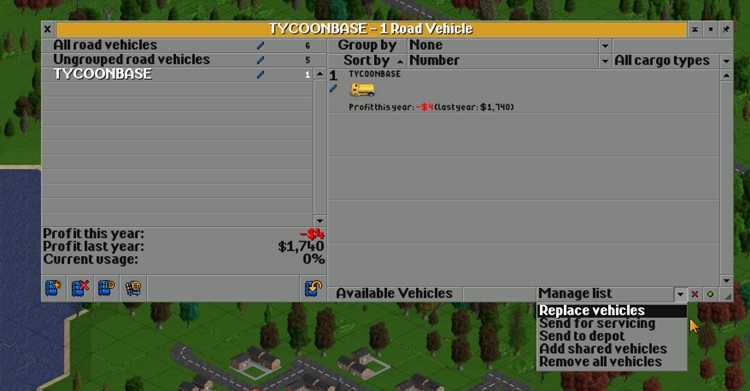
You can access the Groups section by clicking the train, bus, ship, and plane icons located in the top bar. From there, you can create a new group and drag ungrouped vehicles into it. Afterward, click on the group whose vehicles you want to replace, then click the “Manage List” option in the bottom right corner of the screen, select “Replace Vehicles” from the submenu that appears, and choose the vehicle you want to replace the current ones with from the list.
Leave a Reply